Data Cleaning in SQL:
A Beginner's Guide to Cleaning Messy Data
Learn how to clean data in SQL with this beginner-friendly guide. Discover methods for removing duplicates, handling missing values, standardizing data, correcting errors, and more.
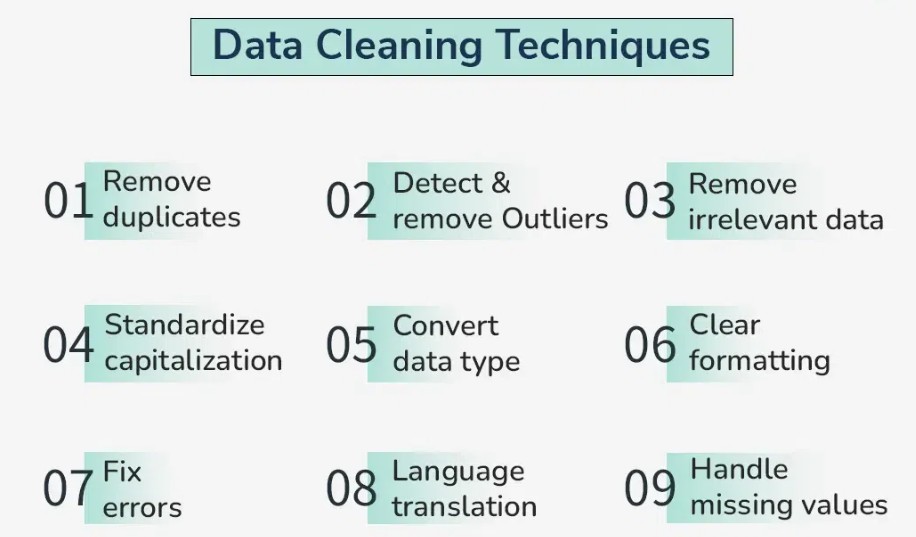
What is Data Cleaning?
Data cleaning is the process of identifying and fixing errors, inconsistencies, and inaccuracies in a dataset. It’s a crucial step in data analysis because dirty data can lead to incorrect conclusions. In SQL, we use queries to clean data by removing duplicates, filling missing values, correcting errors, and standardizing formats.
1. Removing Duplicates
The Problem:
Imagine you have a list of customers, but some of them appear more than once. Duplicates can skew your analysis and lead to incorrect results.
The Solution:
Use the DISTINCT keyword or the ROW_NUMBER() function to remove duplicates.
Example:
Suppose you have a table called Customers:
| CustomerID | Name | |
|---|---|---|
| 1 | Alice | alice@example.com |
| 2 | Bob | bob@example.com |
| 3 | Alice | alice@example.com |
| 4 | Charlie | charlie@example.com |
To remove duplicates based on the Email column:
SELECT DISTINCT Email, Name
FROM Customers;
Result:
| Name | |
|---|---|
| alice@example.com | Alice |
| bob@example.com | Bob |
| charlie@example.com | Charlie |
Alternatively, you can use ROW_NUMBER() to keep only the first occurrence of each duplicate:
WITH CTE AS (
    SELECT
        CustomerID,
        Name,
        Email,
        ROW_NUMBER() OVER (PARTITION BY Email ORDER BY CustomerID) AS RowNum
    FROM
        Customers
)
SELECT
    CustomerID,
    Name,
    Email
FROM
    CTE
WHERE
    RowNum = 1;
2. Handling Missing Values
The Problem:
Sometimes, data is incomplete. For example, some customers might not have an email address. Missing values can cause errors in your analysis.
The Solution:
You can fill missing values with a default value or remove rows with missing data.
Example:
Suppose the Customers table has missing emails:
| CustomerID | Name | |
|---|---|---|
| 1 | Alice | alice@example.com |
| 2 | Bob | NULL |
| 3 | Charlie | charlie@example.com |
To fill missing emails with a default value:
SELECT
    CustomerID,
    Name,
    COALESCE(Email, 'no-email@example.com') AS Email
FROM
    Customers;
Result:
| CustomerID | Name | |
|---|---|---|
| 1 | Alice | alice@example.com |
| 2 | Bob | no-email@example.com |
| 3 | Charlie | charlie@example.com |
To remove rows with missing emails:
SELECT
    CustomerID,
    Name,
    Email
FROM
    Customers
WHERE
    Email IS NOT NULL;
3. Standardizing Data
The Problem:
Data often comes in different formats. For example, names might be in uppercase, lowercase, or mixed case. Inconsistent formatting can make analysis difficult.
The Solution:
Use SQL functions like UPPER(), LOWER(), and TRIM() to standardize data.
Example:
Suppose the Customers table has inconsistent name formatting:
| CustomerID | Name | |
|---|---|---|
| 1 | ALICE | alice@example.com |
| 2 | bob | bob@example.com |
| 3 | Charlie | charlie@example.com |
To standardize names to lowercase:
SELECT
    CustomerID,
    LOWER(Name) AS Name,
    Email
FROM
    Customers;
Result:
| CustomerID | Name | |
|---|---|---|
| 1 | alice | alice@example.com |
| 2 | bob | bob@example.com |
| 3 | charlie | charlie@example.com |
To remove extra spaces:
SELECT
    CustomerID,
    TRIM(Name) AS Name,
    Email
FROM
    Customers;
4. Correcting Errors
The Problem:
Data can contain errors, such as typos or incorrect values. For example, a customer’s age might be entered as 150, which is unrealistic.
The Solution:
Use CASE statements or WHERE clauses to identify and correct errors.
Example:
Suppose the Customers table has an incorrect age:
| CustomerID | Name | Age |
|---|---|---|
| 1 | Alice | 25 |
| 2 | Bob | 150 |
| 3 | Charlie | 30 |
To replace unrealistic ages with NULL:
SELECT
    CustomerID,
    Name,
    CASE
        WHEN Age > 100 THEN NULL
        ELSE Age
    END AS Age
FROM
    Customers;
Result:
| CustomerID | Name | Age |
|---|---|---|
| 1 | Alice | 25 |
| 2 | Bob | NULL |
| 3 | Charlie | 30 |
5. Splitting Columns
The Problem:
Sometimes, data is combined into a single column when it should be split. For example, a full name might be stored as “Alice Smith” instead of separate first and last names.
The Solution:
Use SQL string functions like SUBSTRING(), CHARINDEX(), or LEFT() and RIGHT() to split columns.
Example:
Suppose the Customers table has a FullName column:
| CustomerID | FullName | |
|---|---|---|
| 1 | Alice Smith | alice@example.com |
| 2 | Bob Johnson | bob@example.com |
| 3 | Charlie Brown | charlie@example.com |
To split FullName into FirstName and LastName:
SELECT
    CustomerID,
    LEFT(FullName, CHARINDEX(' ', FullName) - 1) AS FirstName,
    SUBSTRING(FullName, CHARINDEX(' ', FullName) + 1, LEN(FullName)) AS LastName,
    Email
FROM
    Customers;
Result:
| CustomerID | FirstName | LastName | |
|---|---|---|---|
| 1 | Alice | Smith | alice@example.com |
| 2 | Bob | Johnson | bob@example.com |
| 3 | Charlie | Brown | charlie@example.com |
6. Combining Columns
The Problem:
Sometimes, data is split into multiple columns when it should be combined. For example, you might have separate columns for FirstName and LastName but need a single FullName column.
The Solution:
Use the CONCAT() function to combine columns.
Example:
Suppose the Customers table has FirstName and LastName columns:
| CustomerID | FirstName | LastName | |
|---|---|---|---|
| 1 | Alice | Smith | alice@example.com |
| 2 | Bob | Johnson | bob@example.com |
| 3 | Charlie | Brown | charlie@example.com |
To create a FullName column:
SELECT
    CustomerID,
    CONCAT(FirstName, ' ', LastName) AS FullName,
    Email
FROM
    Customers;
Result:
| CustomerID | FullName | |
|---|---|---|
| 1 | Alice Smith | alice@example.com |
| 2 | Bob Johnson | bob@example.com |
| 3 | Charlie Brown | charlie@example.com |
7. Handling Inconsistent Data Types
The Problem:
Sometimes, data is stored in the wrong format. For example, a numeric column might be stored as text.
The Solution:
Use SQL functions like CAST() or CONVERT() to change data types.
Example:
Suppose the Customers table has an Age column stored as text:
| CustomerID | Name | Age |
|---|---|---|
| 1 | Alice | '25' |
| 2 | Bob | '30' |
| 3 | Charlie | '35' |
To convert Age to an integer:
SELECT
    CustomerID,
    Name,
    CAST(Age AS INT) AS Age
FROM
    Customers;
Result:
| CustomerID | Name | Age |
|---|---|---|
| 1 | Alice | 25 |
| 2 | Bob | 30 |
| 3 | Charlie | 35 |
Conclusion
By using SQL to remove duplicates, handle missing values, standardize data, correct errors, and transform columns, you can turn messy data into a valuable resource for analysis. Remember, clean data is the foundation of accurate insights. So, roll up your sleeves, grab your SQL toolkit, and start cleaning!