Comprehensive Guide to SQL Functions:
ROW_NUMBER(), PARTITION BY, and RANK() OVER
Learn how to use SQL functions like ROW_NUMBER(), PARTITION BY, and RANK() OVER with detailed explanations, syntax, examples, and practical use cases.
1. ROW_NUMBER()
Overview
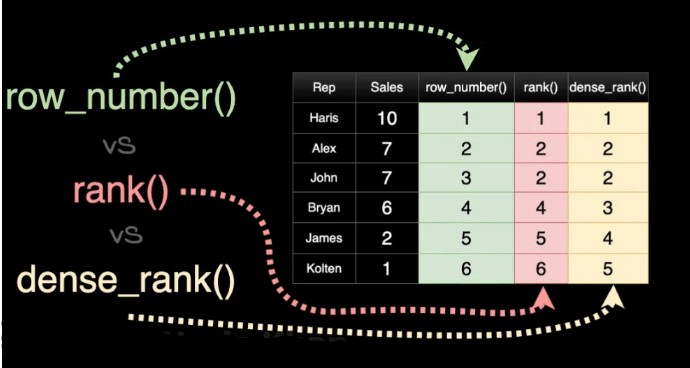
The ROW_NUMBER() function assigns a unique sequential integer to each row within a result set. The numbering starts at 1 for the first row and increments by 1 for each subsequent row. This function is particularly useful for generating unique identifiers or paginating results.
Syntax
ROW_NUMBER() OVER ([PARTITION BY partition_expression, ... ]
			ORDER BY sort_expression [ASC | DESC], ...)
Example
Consider a table Employees with the following data:
| EmployeeID | Name | Department | Salary |
|---|---|---|---|
| 1 | Alice | HR | 50000 |
| 2 | Bob | IT | 60000 |
| 3 | Charlie | HR | 55000 |
| 4 | David | IT | 65000 |
| 5 | Eve | HR | 52000 |
To assign a unique row number to each employee within their department, ordered by salary in descending order:
SELECT
	EmployeeID,
	Name,
	Department,
	Salary,
	ROW_NUMBER() OVER (PARTITION BY Department ORDER BY Salary DESC) AS RowNum
							FROM
								Employees;
Result
| EmployeeID | Name | Department | Salary | RowNum |
|---|---|---|---|---|
| 4 | David | IT | 65000 | 1 |
| 2 | Bob | IT | 60000 | 2 |
| 3 | Charlie | HR | 55000 | 1 |
| 5 | Eve | HR | 52000 | 2 |
| 1 | Alice | HR | 50000 | 3 |
2. PARTITION BY
Overview
The PARTITION BY clause divides the result set into partitions (or groups) based on one or more columns. It is used with window functions like ROW_NUMBER(), RANK(), and DENSE_RANK().
Syntax
PARTITION BY partition_expression, ...Example
Rank employees within each department based on their salary:
SELECT
	EmployeeID,
	Name,
	Department,
	Salary,
		RANK() OVER (PARTITION BY Department ORDER BY Salary DESC) AS Rank
		FROM
			Employees;
Result
| EmployeeID | Name | Department | Salary | Rank |
|---|---|---|---|---|
| 4 | David | IT | 65000 | 1 |
| 2 | Bob | IT | 60000 | 2 |
| 3 | Charlie | HR | 55000 | 1 |
| 5 | Eve | HR | 52000 | 2 |
| 1 | Alice | HR | 50000 | 3 |
3. RANK() OVER
Overview
The RANK() function assigns a unique rank to each row within a partition. If two or more rows have the same values, they receive the same rank, and the next rank(s) are skipped.
Syntax
RANK() OVER (
	[PARTITION BY partition_expression, ... ]
	ORDER BY sort_expression [ASC | DESC], ...
							)
Example
Rank students based on their scores in the Math subject:
SELECT
	StudentID,
	Name,
	Subject,
	Score,
		RANK() OVER (ORDER BY Score DESC) AS Rank
		FROM
		Students
			WHERE
			Subject = 'Math';
Result
| StudentID | Name | Subject | Score | Rank |
|---|---|---|---|---|
| 1 | John | Math | 90 | 1 |
| 3 | Alice | Math | 90 | 1 |
| 2 | Jane | Math | 85 | 3 |
| 5 | Eve | Math | 85 | 3 |
| 4 | Bob | Math | 80 | 5 |
4. DENSE_RANK() OVER
Overview
The DENSE_RANK() function is similar to RANK(), but it does not skip ranks when there are ties. If two or more rows have the same rank, the next rank is assigned consecutively.
Syntax
DENSE_RANK() OVER (
	[PARTITION BY partition_expression, ... ]
	ORDER BY sort_expression [ASC | DESC], ...
							)
Example
Rank students using DENSE_RANK():
SELECT
	StudentID,
	Name,
	Subject,
	Score,
	DENSE_RANK() OVER (ORDER BY Score DESC) AS DenseRank
		FROM
		Students
			WHERE
			Subject = 'Math';
Result
| StudentID | Name | Subject | Score | DenseRank |
|---|---|---|---|---|
| 1 | John | Math | 90 | 1 |
| 3 | Alice | Math | 90 | 1 |
| 2 | Jane | Math | 85 | 2 |
| 5 | Eve | Math | 85 | 2 |
| 4 | Bob | Math | 80 | 3 |
5. Comparison of ROW_NUMBER(), RANK(), and DENSE_RANK()
| Function | Description | Example Output for Ties |
|---|---|---|
ROW_NUMBER() |
Assigns a unique sequential integer to each row within a partition. | 1, 2, 3, 4, 5 |
RANK() |
Assigns the same rank to rows with the same values, skipping the next rank. | 1, 1, 3, 3, 5 |
DENSE_RANK() |
Assigns the same rank to rows with the same values, without skipping ranks. | 1, 1, 2, 2, 3 |
6. Practical Use Cases
6.1. Pagination
Use ROW_NUMBER() for pagination:
WITH RankedEmployees AS (
	SELECT
	EmployeeID,
	Name,
	Department,
	Salary,
	ROW_NUMBER() OVER (ORDER BY Salary DESC) AS RowNum
		FROM
		Employees
	)
	SELECT
		EmployeeID,
		Name,
		Department,
		Salary
		FROM
		RankedEmployees
			WHERE
			RowNum BETWEEN 1 AND 10;
6.2. Ranking within Groups
Use RANK() to rank sales representatives within each region:
SELECT
	SalesRepID,
	Region,
	SalesAmount,
	RANK() OVER (PARTITION BY Region ORDER BY SalesAmount DESC) AS Rank
		FROM
		Sales;
6.3. Removing Duplicates
Use ROW_NUMBER() to remove duplicates:
WITH DuplicateRecords AS (
	SELECT
		*,
		ROW_NUMBER() OVER (PARTITION BY Column1, Column2 ORDER BY ID) AS RowNum
			FROM
			YourTable
			)
			DELETE FROM YourTable
			WHERE ID IN (
			SELECT ID FROM DuplicateRecords WHERE RowNum > 1
				);
7. Conclusion
SQL's analytical functions, such as ROW_NUMBER(), PARTITION BY, and RANK() OVER, are powerful tools for data analysis and manipulation. These functions allow you to perform complex calculations, such as ranking, partitioning, and assigning unique row numbers, directly within the database. By mastering these functions, you can significantly enhance your ability to analyze and manipulate data in SQL.