Subqueries and CTEs in SQL:
A Beginner's Guide with Examples
Learn how to use subqueries and CTEs in SQL with this beginner-friendly guide. Discover methods for simplifying complex queries with examples from a food delivery company in Bangladesh.
What Are Subqueries?
A subquery is a query nested inside another query. It’s like asking a question within a question. Subqueries can be used in SELECT, FROM, WHERE, and HAVING clauses. They help you break down complex problems into smaller, more manageable parts.
Types of Subqueries:
- Scalar Subqueries: Return a single value.
- Row Subqueries: Return a single row with multiple columns.
- Column Subqueries: Return a single column with multiple rows.
- Table Subqueries: Return a full table.
1. Scalar Subqueries
The Problem:
You want to find the average order value for all orders in Dhaka.
The Solution:
Use a scalar subquery to calculate the average order value and compare it with individual orders.
Example:
Suppose you have a table called Orders:
| OrderID | CustomerName | City | OrderValue |
|---|---|---|---|
| 1 | Ayesha Rahman | Dhaka | 500 |
| 2 | Rafiqul Islam | Chittagong | 700 |
| 3 | Fatima Akter | Dhaka | 300 |
| 4 | Karim Ahmed | Sylhet | 600 |
To find orders in Dhaka with a value greater than the average order value:
SELECT OrderID, CustomerName, OrderValue
FROM Orders
WHERE City = 'Dhaka'
  AND OrderValue > (SELECT AVG(OrderValue) FROM Orders WHERE City = 'Dhaka');
Result:
| OrderID | CustomerName | OrderValue |
|---|---|---|
| 1 | Ayesha Rahman | 500 |
2. Row Subqueries
The Problem:
You want to find the customer with the highest order value in Dhaka.
The Solution:
Use a row subquery to find the maximum order value and retrieve the corresponding customer.
Example:
SELECT CustomerName, OrderValue
FROM Orders
WHERE (OrderValue, City) = (
    SELECT MAX(OrderValue), City
    FROM Orders
    WHERE City = 'Dhaka'
    GROUP BY City
);
Result:
| CustomerName | OrderValue |
|---|---|
| Ayesha Rahman | 500 |
3. Column Subqueries
The Problem:
You want to find all customers in Dhaka who have placed orders above the average order value.
The Solution:
Use a column subquery to compare each order value with the average.
Example:
SELECT CustomerName, OrderValue
FROM Orders
WHERE City = 'Dhaka'
  AND OrderValue > (SELECT AVG(OrderValue) FROM Orders WHERE City = 'Dhaka');
Result:
| CustomerName | OrderValue |
|---|---|
| Ayesha Rahman | 500 |
4. Table Subqueries
The Problem:
You want to find the top 3 restaurants in Dhaka based on the number of orders.
The Solution:
Use a table subquery to rank restaurants by order count and filter the top 3.
Example:
Suppose you have a table called Restaurants:
| RestaurantID | RestaurantName | City | OrderCount |
|---|---|---|---|
| 1 | Spice Garden | Dhaka | 150 |
| 2 | Chilli Pot | Chittagong | 100 |
| 3 | Biryani House | Dhaka | 200 |
| 4 | Noodle World | Sylhet | 80 |
To find the top 3 restaurants in Dhaka:
SELECT RestaurantName, OrderCount
FROM (
    SELECT RestaurantName, OrderCount
    FROM Restaurants
    WHERE City = 'Dhaka'
    ORDER BY OrderCount DESC
    LIMIT 3
) AS TopRestaurants;
Result:
| RestaurantName | OrderCount |
|---|---|
| Biryani House | 200 |
| Spice Garden | 150 |
What Are CTEs (Common Table Expressions)?
A CTE is a temporary result set that you can reference within a SELECT, INSERT, UPDATE, or DELETE statement. It’s like creating a mini-table that exists only for the duration of your query. CTEs make your queries more readable and modular.
Syntax:
WITH CTE_Name AS (
    -- Subquery here
)
SELECT * FROM CTE_Name;
1. Simple CTE
The Problem:
You want to find the total revenue generated by each city.
The Solution:
Use a CTE to calculate the total revenue per city and then display the results.
Example:
WITH CityRevenue AS (
    SELECT City, SUM(OrderValue) AS TotalRevenue
    FROM Orders
    GROUP BY City
)
SELECT * FROM CityRevenue;
Result:
| City | TotalRevenue |
|---|---|
| Dhaka | 800 |
| Chittagong | 700 |
| Sylhet | 600 |
2. Recursive CTE
The Problem:
You want to find the hierarchy of delivery zones in Dhaka.
The Solution:
Use a recursive CTE to build the hierarchy.
Example:
Suppose you have a table called DeliveryZones:
| ZoneID | ZoneName | ParentZoneID |
|---|---|---|
| 1 | Dhaka North | NULL |
| 2 | Dhaka South | NULL |
| 3 | Gulshan | 1 |
| 4 | Banani | 1 |
| 5 | Dhanmondi | 2 |
To find the hierarchy:
WITH RecursiveCTE AS (
    SELECT ZoneID, ZoneName, ParentZoneID
    FROM DeliveryZones
    WHERE ParentZoneID IS NULL
    UNION ALL
    SELECT d.ZoneID, d.ZoneName, d.ParentZoneID
    FROM DeliveryZones d
    INNER JOIN RecursiveCTE r ON d.ParentZoneID = r.ZoneID
)
SELECT * FROM RecursiveCTE;
Result:
| ZoneID | ZoneName | ParentZoneID |
|---|---|---|
| 1 | Dhaka North | NULL |
| 2 | Dhaka South | NULL |
| 3 | Gulshan | 1 |
| 4 | Banani | 1 |
| 5 | Dhanmondi | 2 |
3. CTE with Multiple Queries
The Problem:
You want to find the top 3 customers in Dhaka based on their total order value.
The Solution:
Use a CTE to calculate the total order value for each customer and then filter the top 3.
Example:
WITH CustomerTotal AS (
    SELECT CustomerName, SUM(OrderValue) AS TotalOrderValue
    FROM Orders
    WHERE City = 'Dhaka'
    GROUP BY CustomerName
)
SELECT CustomerName, TotalOrderValue
FROM CustomerTotal
ORDER BY TotalOrderValue DESC
LIMIT 3;
Result:
| CustomerName | TotalOrderValue |
|---|---|
| Ayesha Rahman | 500 |
| Fatima Akter | 300 |
4. CTE with Joins
The Problem:
You want to find the total revenue generated by each restaurant in Dhaka.
The Solution:
Use a CTE to join the Orders and Restaurants tables and calculate the total revenue.
Example:
WITH RestaurantRevenue AS (
    SELECT r.RestaurantName, SUM(o.OrderValue) AS TotalRevenue
    FROM Orders o
    JOIN Restaurants r ON o.RestaurantID = r.RestaurantID
    WHERE r.City = 'Dhaka'
    GROUP BY r.RestaurantName
)
SELECT * FROM RestaurantRevenue;
Result:
| RestaurantName | TotalRevenue |
|---|---|
| Biryani House | 800 |
| Spice Garden | 600 |
Subqueries vs CTEs: A Detailed Comparison
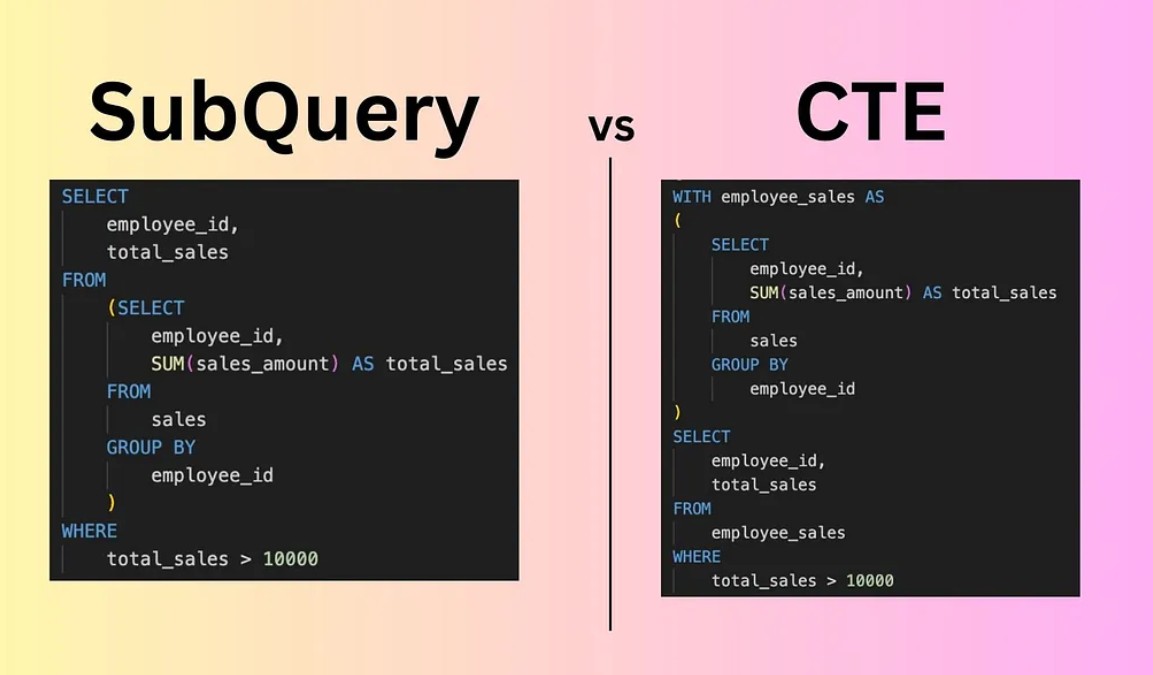
Both subqueries and CTEs are powerful tools for breaking down complex queries, but they have some key differences. Let’s compare them in detail:
1. Readability and Maintainability
- Subqueries: Nested queries can become hard to read and maintain, especially when you have multiple levels of nesting.
SELECT CustomerName FROM Orders WHERE OrderValue > (SELECT AVG(OrderValue) FROM Orders); - CTEs: CTEs make your queries more readable and modular by breaking them into logical blocks.
WITH AvgOrderValue AS (
    SELECT AVG(OrderValue) AS AvgValue
    FROM Orders
)
SELECT CustomerName
FROM Orders, AvgOrderValue
WHERE OrderValue > AvgOrderValue.AvgValue;
2. Reusability
- Subqueries: Subqueries are not reusable. If you need the same subquery in multiple places, you’ll have to rewrite it.
SELECT CustomerName FROM Orders WHERE OrderValue > (SELECT AVG(OrderValue) FROM Orders) AND City = (SELECT City FROM Customers WHERE CustomerName = 'Ayesha Rahman'); - CTEs: CTEs are reusable within the same query. You can define a CTE once and reference it multiple times.
WITH AvgOrderValue AS (
    SELECT AVG(OrderValue) AS AvgValue
    FROM Orders
),
CustomerCity AS (
    SELECT City
    FROM Customers
    WHERE CustomerName = 'Ayesha Rahman'
)
SELECT CustomerName
FROM Orders, AvgOrderValue, CustomerCity
WHERE OrderValue > AvgOrderValue.AvgValue
  AND City = CustomerCity.City;
3. Performance
- Subqueries: Subqueries can sometimes lead to performance issues, especially if they are correlated (i.e., the subquery depends on the outer query).
SELECT CustomerName FROM Orders o WHERE OrderValue > (SELECT AVG(OrderValue) FROM Orders WHERE City = o.City); - CTEs: CTEs are generally optimized by the SQL engine, making them more efficient for complex queries.
WITH CityAvgOrderValue AS (
    SELECT City, AVG(OrderValue) AS AvgValue
    FROM Orders
    GROUP BY City
)
SELECT o.CustomerName
FROM Orders o
JOIN CityAvgOrderValue c ON o.City = c.City
WHERE o.OrderValue > c.AvgValue;
4. Recursive Queries
- Subqueries: Subqueries cannot handle recursive queries.
- CTEs: CTEs support recursion, making them ideal for hierarchical data like organizational charts or delivery zones.
WITH RecursiveCTE AS (
    SELECT ZoneID, ZoneName, ParentZoneID
    FROM DeliveryZones
    WHERE ParentZoneID IS NULL
    UNION ALL
    SELECT d.ZoneID, d.ZoneName, d.ParentZoneID
    FROM DeliveryZones d
    INNER JOIN RecursiveCTE r ON d.ParentZoneID = r.ZoneID
)
SELECT * FROM RecursiveCTE;
5. Use Cases
- Subqueries: Best for simple, one-off calculations or filtering.
SELECT CustomerName FROM Orders WHERE OrderValue > (SELECT AVG(OrderValue) FROM Orders); - CTEs: Best for complex queries, reusable logic, and recursive problems.
WITH AvgOrderValue AS (
    SELECT AVG(OrderValue) AS AvgValue
    FROM Orders
)
SELECT CustomerName
FROM Orders, AvgOrderValue
WHERE OrderValue > AvgOrderValue.AvgValue;
Conclusion
Subqueries and CTEs are very useful in SQL. They help you break down complex problems into smaller, more manageable pieces, making your queries more readable and efficient. Whether you’re analyzing restaurant performance, tracking customer behavior, or optimizing delivery routes, these tools will help you unlock the full potential of your data.
So, the next time you’re faced with a complex query, remember: Simplify, Break Down, and Conquer.